

The Domain Security Report turns a tenant’s Domain Security scan into a white-labeled PDF you can hand to a client. It shows, for every custom domain in the tenant, whether SPF, DMARC, and DKIM are configured, whether the domain can be spoofed, and the exact fix for anything misconfigured. The report uses your organization’s logo and name, so it is ready to share with the client directly.Documentation Index
Fetch the complete documentation index at: https://docs.petrasecurity.com/docs/llms.txt
Use this file to discover all available pages before exploring further.
How to download it
- Open a tenant page and click Domain Security to open the scan.
- Wait for the scan to finish (it checks every custom domain your tenant’s users send from).
- Click Download PDF.
{tenant}_domain_security_{date}.pdf.
What’s in the report
The report opens with a cover and summary page, then dedicates one page to each domain.Cover and summary
The first page carries your logo and name, the tenant name, the scan date, and a summary table listing every domain with its SPF, DMARC, and DKIM status at a glance.One page per domain
Each domain gets its own page showing the overall spoofing risk, a status for SPF, DMARC, and DKIM, and for each record: what it means, the risk it creates, the raw DNS record, and the exact fix.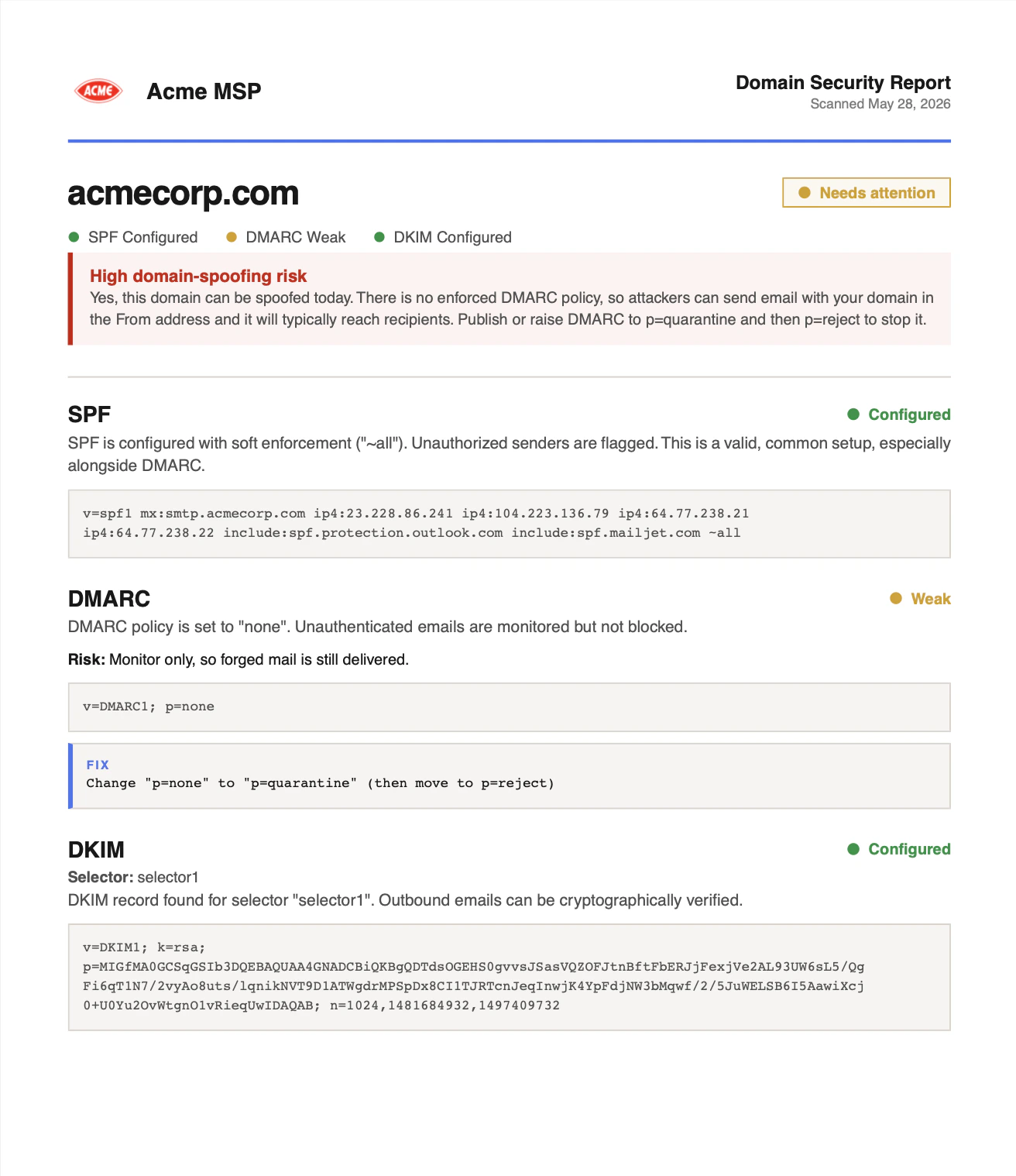
Related
- Domain Security (SPF, DMARC, DKIM) explains every result and how to fix it.