

What are Microsoft 365 Audit Logs?
Microsoft 365 Unified Audit Logs (UAL) record user and admin activity across your Microsoft 365 environment: logins, email access, SharePoint activity, Teams interactions, and more. Petra relies on these logs to detect threats, investigate incidents, and produce reports.How to enable audit logs
Audit logging needs to be turned on in your Microsoft 365 tenant. To enable it:- Sign in to the Microsoft Purview compliance portal as a Global Admin.
- Navigate to Solutions > Audit.
- If you see a banner that says “Start recording user and admin activity”, click it to turn on audit logging.
- If you don’t see the banner, auditing is already enabled for your tenant.
There is no cost to enable audit logging and it does not require any additional Microsoft licensing.
Do I need to enable audit logs myself?
For monitoring: No. When you onboard a tenant, Petra checks the audit log status and enables them for you automatically. For the Scan lookback: Audit logs need to have been on already. Petra Scan investigates the last 6 months of activity, but it can only analyze logs that Microsoft was actively recording. If audit logs were recently enabled, the lookback only covers the period since they were turned on. Microsoft does not backfill logs retroactively.How to check if your logs are flowing
From the Tenants table: If a tenant’s status shows Audit Logs Not Enabled, audit logging is not turned on for that tenant. From the Activity Viewer: Navigate into the tenant and scroll down to the logs section. Browse through the Logins, Exchange, SharePoint, and Teams tabs and look at the date range of available data:- If logs stop abruptly at a date within the last 6 months, that is most likely when audit logging was enabled for the tenant. Everything before that date was not recorded by Microsoft.
- If the tenant was recently onboarded, Petra may still be backfilling. See below for expected timelines.
How to tell when audit logs were enabled
Click into a tenant and look at Tenant Statistics. You’ll see an entry like Audit Logging enabled <date> showing exactly when logging was turned on for that tenant. If audit logs were enabled within the last 6 months, a banner at the top of the tenant page also calls this out.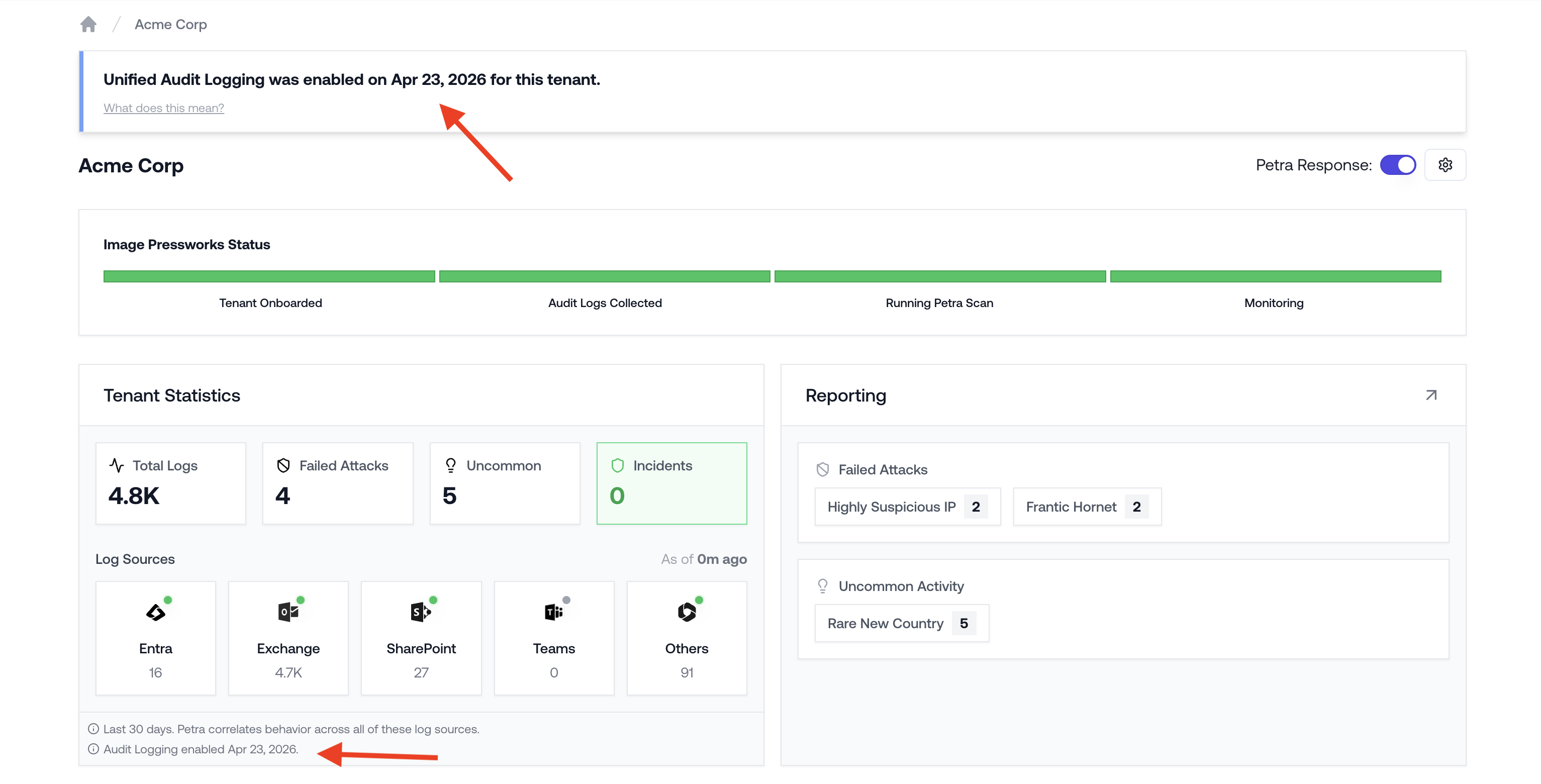
Audit Logging enabled date in Tenant Statistics, with the recently-enabled banner at the top
How long does backfill take?
When you onboard a new tenant, Petra pulls up to 6 months of historical audit logs from Microsoft. This process typically takes up to 72 hours, depending on:- The volume of activity in the tenant
- Microsoft API response times and rate limits
- The number of users and event types
Microsoft’s own APIs can introduce delays in surfacing audit log data. If your backfill seems slow, this is almost always due to Microsoft-side throttling rather than an issue with Petra.