
Multi-Stream Tracking an AitM Attack: From Lure to Lockout
Catching an attacker red-handed across event streams — from a OneDrive phishing lure to an automated AitM toolkit in action.
If you've experienced an M365 attack, you know how siloed Microsoft logs can be.
Stitching together attack activity using Powershell queries is messy and slow.
Even after the investigation is "done", you often end up with a nagging feeling that you don't have the whole picture.
But, if we combine these logs in the right way, we can get an incredibly clear picture of attacker behavior.
This research article is one such example. It's a deep dive into an AitM attack where the attacker uses OneDrive to lure the user into handing over their credentials.
Let's dive in.
The Lure: OneDrive Link from Someone they Know
Minutes before the user gets compromised, we see the lure in the Exchange logs: they receive a OneDrive doc from a compromised collaborator they've worked with before.
Seconds later, the user receives an email with a OneDrive 2FA code.
This tells us that Microsoft's authentication service has received the user's password, and is now challenging them for a second credential. The user is blissfully unaware that an attacker is sitting between them and Microsoft ...

We see this type of attack quite a bit, and it's fairly tricky to catch:
- "Shared a doc with you" message seems benign, unlikely to get flagged.
- Sender is someone they know/have emailed before, unlikely to get sent to spam.
- Microsoft login page is expected, it's a OneDrive doc.
It's easy to see why users fall for this kind of lure, and why existing security stacks don't do a great job of preventing it.
The Compromise: Attacker Relays User's Credentials to Microsoft
Not even a minute after the user receives their OneDrive 2FA code, we see suspicious logins from global internet solutions llc, a datacenter seen in many AitM attacks.
The UserStrongAuthClientAuthNRequiredInterrupt followed by Success shows the attacker relaying both the password and 2FA code, creating a legitimate session.
Less than 10 minutes after the OneDrive doc was shared, the attacker gets in.

Evasive Maneuvers: New Proxy, Automated Toolkit
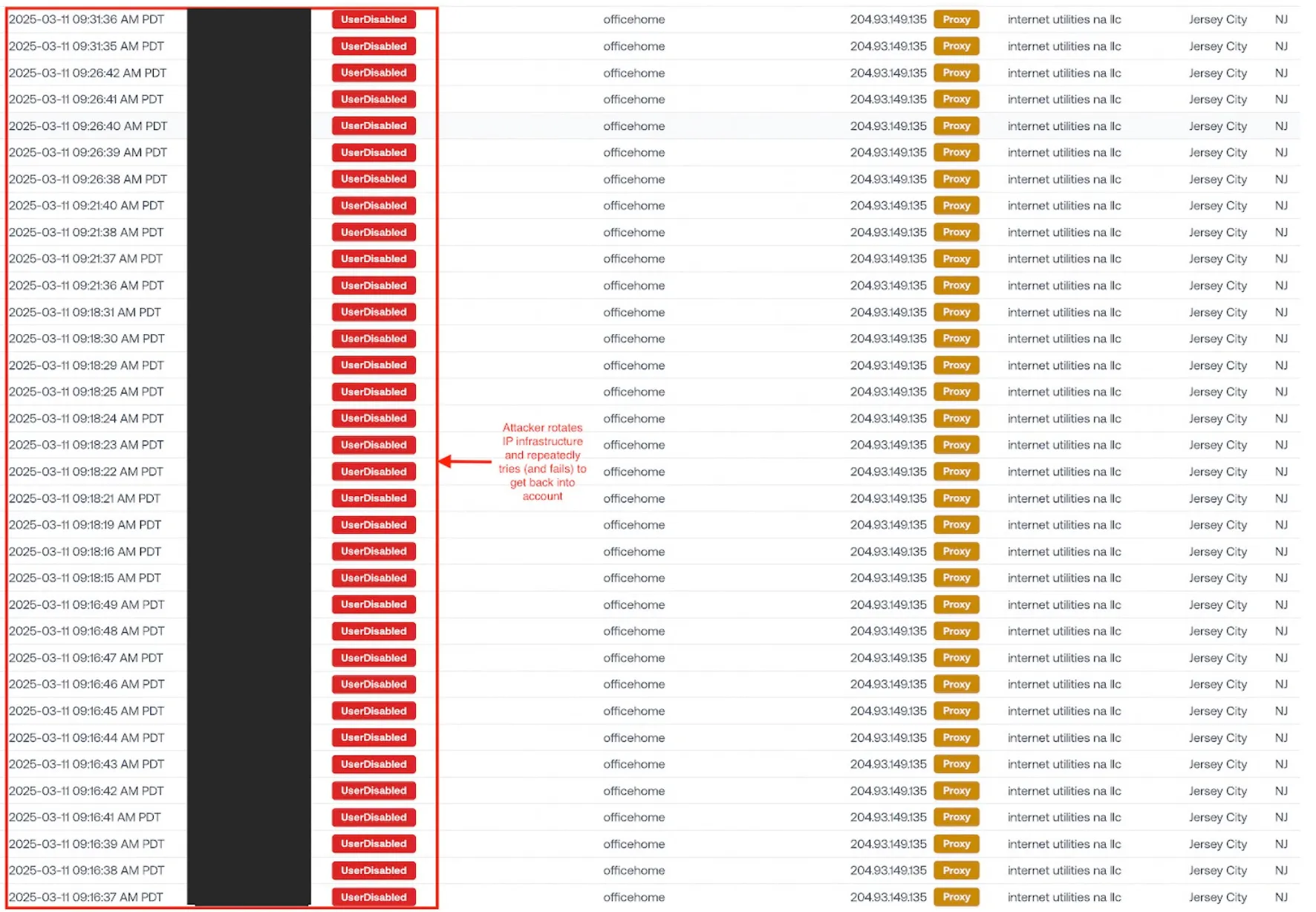
After being promptly kicked out, the attacker switches over to a new proxy IP to evade further detection. They repeatedly try (and fail) to log in with their session.
This wall of failed logins is a pretty clear indication that the attacker's using an automated toolkit.
We've seen automated toolkit behavior before when doing backward-looking searches in a compromised environment. Automated toolkits are often used to exfiltrate the mailbox, perform invoice fraud, and laterally phish other users.
Takeaway: Microsoft's Audit Logs Are All You Need
The audit logs are truly a treasure trove of information. Bringing together all those data streams to form a complete picture isn't easy — but when done right, it's a game changer for detection and response.
Not only does it give us a view into the attacker's mind and toolset — it also highlights that we can actually see a very detailed story if we organize Microsoft's scattered API data in the right way.
The email with the OneDrive 2FA code was invaluable context that allowed us to detect the attacker before they could do any damage.
While the lure for this particular attack appeared in Exchange, we saw another one last week in Teams. As attackers evolve their tactics, closely monitoring as many log sources as possible gives us the best chance of keeping the bad guys out.





See what's in your last six months of logs.
Get insurance-grade forensics on the last 6 months of your M365 logs. Setup takes 5 minutes with results in 48 hours.