
Microsoft Misses Impossible Travel in Email Activity
How an attacker accessed a US account from Turkey without triggering Microsoft alerts.
The Missed Attack
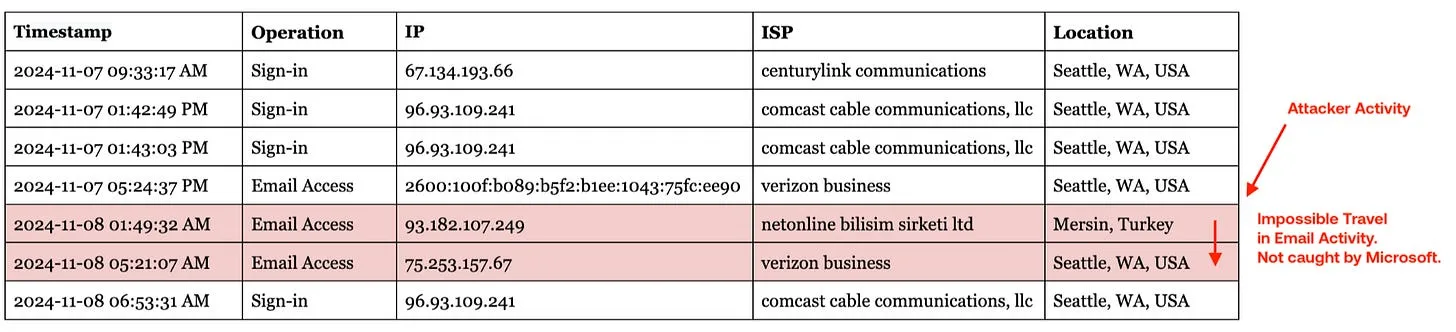
Microsoft's detections missed an attacker in Turkey accessing a Seattle-based account.
This is textbook impossible travel - you can't travel from Turkey to Seattle in 4.5 hours (RIP Concorde):
Why Did Entra ID Miss This?
Entra ID only flags atypical travel on sign-ins; it doesn't evaluate at email activity.
Because it doesn't look at email activity, Entra ID's risky sign-in alerts never even saw the suspicious jump to Turkey:

Why Did Defender for Cloud Apps Miss This?
While Entra ID focuses on sign-ins, Defender for Cloud Apps monitors broader telemetry and should have caught this (theoretically).
Unfortunately, the Defender for Cloud Apps impossible travel alert is a black box—it ignores certain IPs and relies on behavioral ML.
Anecdotally, I've only ever seen that alert fire on two sign-ins from far-flung locations in very quick succession, which would explain why it was silent here.
The Takeaway: Email Activity Analysis Matters.
Analyzing sign-ins isn't enough to catch the bad guys.
In our dataset, sign-ins make up just 0.3% of all logs.
Because sign-ins are just 0.3% of the activity, it's easy for attackers to hide if you're only looking there.
This was a real "impossible travel" scenario that Microsoft missed—and anyone focusing solely on sign-ins would've missed it, too.
Note: Every session starts with an authentication event. In our case, the Turkey attacker did appear in the sign-in logs—but only once and via a VPN located in Los Angeles. Microsoft's alerts don't fire on VPNs because they are often false positives





See what's in your last six months of logs.
Get insurance-grade forensics on the last 6 months of your M365 logs. Setup takes 5 minutes with results in 48 hours.